# How to implement dark mode using TailwindCSS?

Dark mode is something which has gained a lot of popularity in the last few years. Many popular websites are also implementing a dark mode on their website.
However, dark mode can be a pain to setup if your css isn't well structured. Tailwind makes it very easy and instinctive to implement it. In this article, I'm going to go over how you can implement dark mode using Tailwind CSS.

## Prerequisites
- You should have a basic knowledge of Tailwind CSS.
- You should know a little Javascript to understand how the theme toggle works.

## Setup
Let's start by setting up a tailwind project. You also use bundlers like parcel, and this can also be used with any framework. Just setting up tailwind will be different and you can check that out [here](https://tailwindcss.com/docs/installation/framework-guides).
I will be using it using [npm](https://npmjs.com) without any bundler and with just HTML.

### Create folder
<div class="code-metadata">
sh
</div>

```sh
mkdir dark-mode-tailwindcss
cd dark-mode-tailwindcss
npm init -y
```
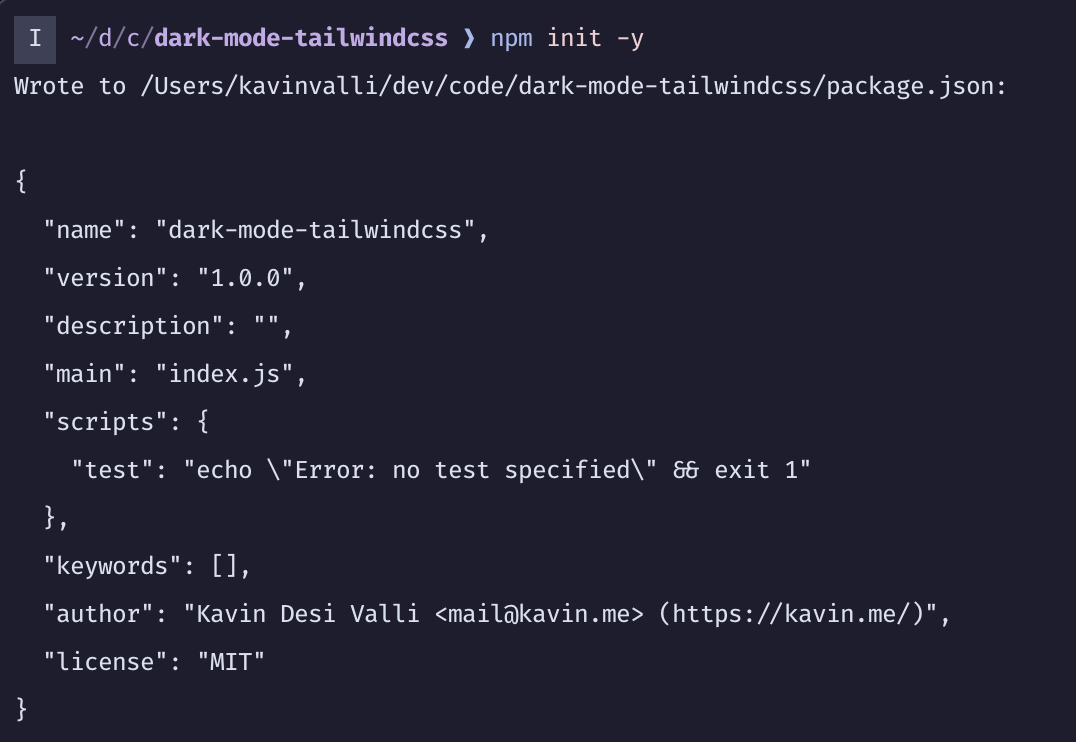
You will see something like this
![Npm Init Output](https://cdn.hashnode.com/res/hashnode/image/upload/v1647970911855/BYRjDSthc.png)

### Install Tailwind
<div class="code-metadata">
sh
</div>

```sh
npm i -D tailwindcss
```

![Install Tailwind](https://cdn.hashnode.com/res/hashnode/image/upload/v1647971509837/rP7WOvfJD.png)

### Setup Tailwind
<div class="code-metadata">
sh
</div>

```sh
npx tailwindcss init
```

![Initialize Tailwind Config](https://cdn.hashnode.com/res/hashnode/image/upload/v1647971553683/iSQO_vkc2.png)

Open `tailwind.config.js` and make the following change:
<div class="code-metadata">
tailwind.config.js
</div>

```diff
-  content: [],
+  content: ['./**/*.html'],
```
This will look for all html files and look for tailwind classes through them. Now, let's create an html file to start off with

<div class="code-metadata">
sh
</div>

```sh
touch index.html
```

### When to use Dark Mode?
Now, tailwind supports two ways of using Dark Mode. One is `prefers-color-scheme` and one is using `classes`. So, the way the former works is, if the users system's preferred mode is dark mode then it'll use dark mode else will use light mode. In the class based mode, it will be applied when the `dark` class is applied to any element before the current element in the tree.
In this article, I'll be using classes just to demonstrate how to toggle between them, but feel free to use any. Not that `prefers-color-scheme` mode is used by default. To use `class` based mode you need to add the following line in `tailwind.config.js`

<div class="code-metadata">
tailwind.config.js
</div>

```diff
module.exports = {
+  darkMode: 'class',
   ...
}
```

### Setup tailwind css file
Create a src directory with the tailwind css file

<div class="code-metadata">
sh
</div>

```sh
mkdir -p src/css
touch src/css/tailwind.css
```
and add the following contents to it

<div class="code-metadata">
src/css/tailwind.css
</div>

```css
@tailwind base;
@tailwind utilities;
@tailwind components;
```

### Setup css build commands
In your package.json make the following changes

<div class="code-metadata">
package.json
</div>

```diff
...
  "scripts": {
-    "test": "echo \"Error: no test specified\" && exit 1"
+    "css:build": "tailwindcss -i src/css/tailwind.css -o dist/css/tailwind.css",
+    "css:watch": "tailwindcss -i src/css/tailwind.css -o dist/css/tailwind.css --watch"
  },
...
```
And then run

<div class="code-metadata">
sh
</div>

```sh
npm run css:watch
```

## Setup html
<div class="code-metadata">
index.html
</div>

```html
<!DOCTYPE html>
<html lang="en">
  <head>
    <meta charset="UTF-8" />
    <meta http-equiv="X-UA-Compatible" content="IE=edge" />
    <meta name="viewport" content="width=device-width, initial-scale=1.0" />
    <link rel="stylesheet" href="./dist/css/tailwind.css" />
    <title>Tailwind Dark Mode</title>
  </head>
  <body>


  </body>
</html>
```
Now, this will be our starting point to the html. I've added the stylesheet which points to the compiled css generated by the Tailwind CLI.

I'm gonna setup a basic html site like so:

<div class="code-metadata">
index.html
</div>

```html
  <body>
    <div
      class="h-screen w-full bg-gray-100 dark:bg-gray-800 flex justify-center items-center"
    >
      <div class="bg-white text-gray-800 rounded-lg p-4 text-center">
        <h1 class="text-2xl font-bold">Tailwind Dark Mode</h1>
        <p>This is a demo of Tailwind CSS Dark Mode.</p>
      </div>
      <button
        class="absolute bottom-5 right-5 w-10 h-10 rounded-full bg-gray-800 flex justify-center items-center text-white"
        id="theme-toggle"
      >
        <svg
          width="24"
          height="24"
          viewBox="0 0 24 24"
          fill="none"
          xmlns="http://www.w3.org/2000/svg"
        >
          <path
            fill-rule="evenodd"
            clip-rule="evenodd"
            d="M12.2256 2.00253C9.59172 1.94346 6.93894 2.9189 4.92893 4.92891C1.02369 8.83415 1.02369 15.1658 4.92893 19.071C8.83418 22.9763 15.1658 22.9763 19.0711 19.071C21.0811 17.061 22.0565 14.4082 21.9975 11.7743C21.9796 10.9772 21.8669 10.1818 21.6595 9.40643C21.0933 9.9488 20.5078 10.4276 19.9163 10.8425C18.5649 11.7906 17.1826 12.4053 15.9301 12.6837C14.0241 13.1072 12.7156 12.7156 12 12C11.2844 11.2844 10.8928 9.97588 11.3163 8.0699C11.5947 6.81738 12.2094 5.43511 13.1575 4.08368C13.5724 3.49221 14.0512 2.90664 14.5935 2.34046C13.8182 2.13305 13.0228 2.02041 12.2256 2.00253ZM17.6569 17.6568C18.9081 16.4056 19.6582 14.8431 19.9072 13.2186C16.3611 15.2643 12.638 15.4664 10.5858 13.4142C8.53361 11.362 8.73568 7.63895 10.7814 4.09281C9.1569 4.34184 7.59434 5.09193 6.34315 6.34313C3.21895 9.46732 3.21895 14.5326 6.34315 17.6568C9.46734 20.781 14.5327 20.781 17.6569 17.6568Z"
            fill="currentColor"
          />
        </svg>
      </button>
    </div>

    <script src="./src/js/index.js"></script>
  </body>
```

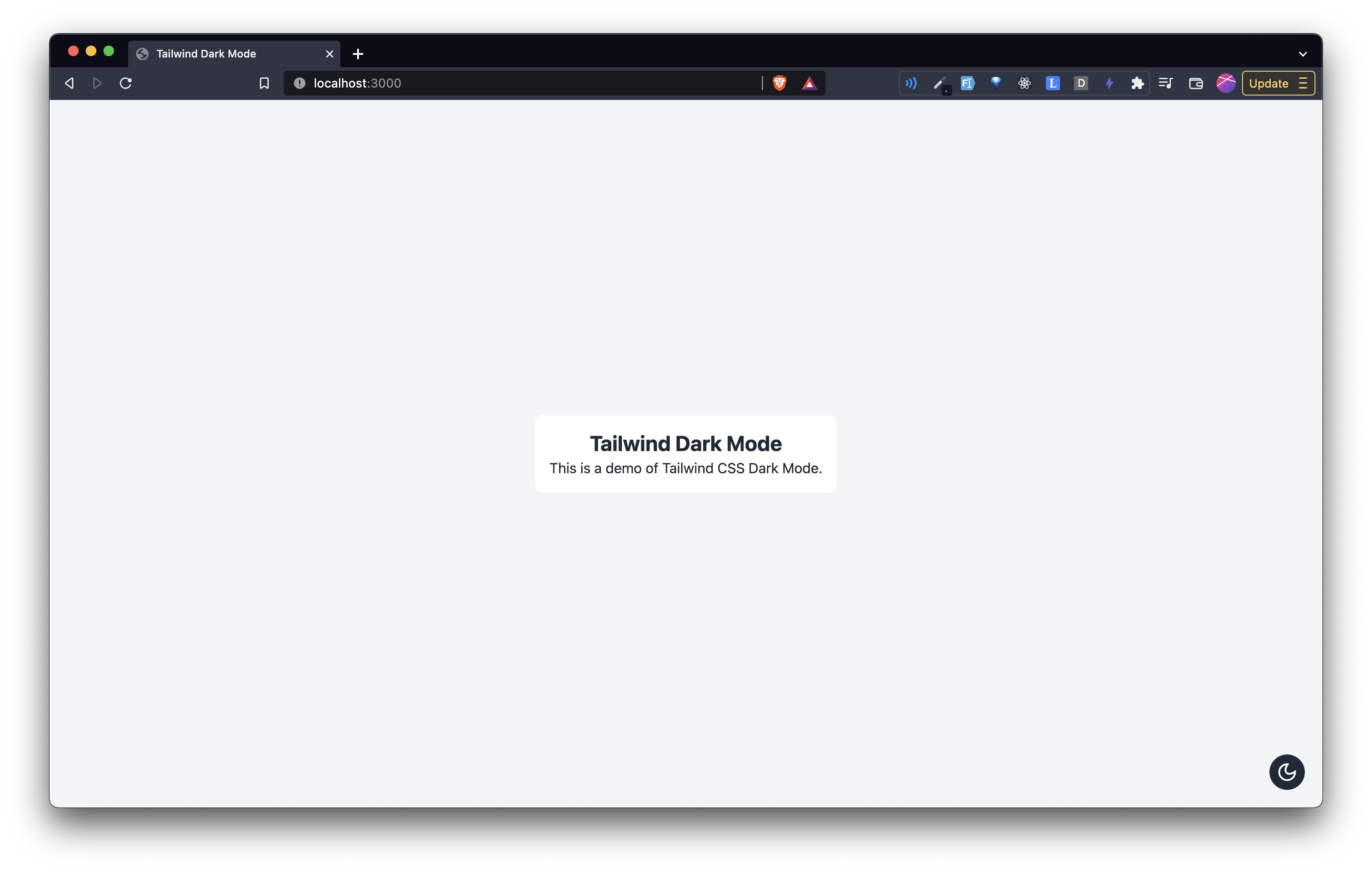
Should show you something like this:
![Starting HTML](https://cdn.hashnode.com/res/hashnode/image/upload/v1648001444406/BoMaWJfSu.png)

> I'm using the [serve](https://npmjs.org/serve) package by [Vercel](https://vercel.com) to serve my html. Just run `npx serve` from your project directory.

## Javascript
We'll be needing a little bit of javascript to manage the dark mode.
Add this in the `index.html` file:

<div class="code-metadata">
index.html
</div>

```diff
...
+    <script src="./src/js/index.js"></script>
  </body>
...
```

Now, create an index.js file

<div class="code-metadata">
sh
</div>

```sh
mkdir src/js
touch src/js/index.js
```

Add the following to the `index.js` file.

<div class="code-metadata">
src/js/index.js
</div>

```js
const themeToggleButton = document.getElementById("theme-toggle");

const MOON_SVG = `<svg width="24" height="24" viewBox="0 0 24 24" fill="none" xmlns="http://www.w3.org/2000/svg"><path fill-rule="evenodd" clip-rule="evenodd" d="M12.2256 2.00253C9.59172 1.94346 6.93894 2.9189 4.92893 4.92891C1.02369 8.83415 1.02369 15.1658 4.92893 19.071C8.83418 22.9763 15.1658 22.9763 19.0711 19.071C21.0811 17.061 22.0565 14.4082 21.9975 11.7743C21.9796 10.9772 21.8669 10.1818 21.6595 9.40643C21.0933 9.9488 20.5078 10.4276 19.9163 10.8425C18.5649 11.7906 17.1826 12.4053 15.9301 12.6837C14.0241 13.1072 12.7156 12.7156 12 12C11.2844 11.2844 10.8928 9.97588 11.3163 8.0699C11.5947 6.81738 12.2094 5.43511 13.1575 4.08368C13.5724 3.49221 14.0512 2.90664 14.5935 2.34046C13.8182 2.13305 13.0228 2.02041 12.2256 2.00253ZM17.6569 17.6568C18.9081 16.4056 19.6582 14.8431 19.9072 13.2186C16.3611 15.2643 12.638 15.4664 10.5858 13.4142C8.53361 11.362 8.73568 7.63895 10.7814 4.09281C9.1569 4.34184 7.59434 5.09193 6.34315 6.34313C3.21895 9.46732 3.21895 14.5326 6.34315 17.6568C9.46734 20.781 14.5327 20.781 17.6569 17.6568Z" fill="currentColor" /></svg>`;
const SUN_SVG = `<svg width="24" height="24" viewBox="0 0 24 24" fill="none" xmlns="http://www.w3.org/2000/svg"><path fill-rule="evenodd" clip-rule="evenodd" d="M12 16C14.2091 16 16 14.2091 16 12C16 9.79086 14.2091 8 12 8C9.79086 8 8 9.79086 8 12C8 14.2091 9.79086 16 12 16ZM12 18C15.3137 18 18 15.3137 18 12C18 8.68629 15.3137 6 12 6C8.68629 6 6 8.68629 6 12C6 15.3137 8.68629 18 12 18Z" fill="currentColor" /><path fill-rule="evenodd" clip-rule="evenodd" d="M11 0H13V4.06189C12.6724 4.02104 12.3387 4 12 4C11.6613 4 11.3276 4.02104 11 4.06189V0ZM7.0943 5.68018L4.22173 2.80761L2.80752 4.22183L5.6801 7.09441C6.09071 6.56618 6.56608 6.0908 7.0943 5.68018ZM4.06189 11H0V13H4.06189C4.02104 12.6724 4 12.3387 4 12C4 11.6613 4.02104 11.3276 4.06189 11ZM5.6801 16.9056L2.80751 19.7782L4.22173 21.1924L7.0943 18.3198C6.56608 17.9092 6.09071 17.4338 5.6801 16.9056ZM11 19.9381V24H13V19.9381C12.6724 19.979 12.3387 20 12 20C11.6613 20 11.3276 19.979 11 19.9381ZM16.9056 18.3199L19.7781 21.1924L21.1923 19.7782L18.3198 16.9057C17.9092 17.4339 17.4338 17.9093 16.9056 18.3199ZM19.9381 13H24V11H19.9381C19.979 11.3276 20 11.6613 20 12C20 12.3387 19.979 12.6724 19.9381 13ZM18.3198 7.0943L21.1923 4.22183L19.7781 2.80762L16.9056 5.6801C17.4338 6.09071 17.9092 6.56608 18.3198 7.0943Z" fill="currentColor" /></svg>`;

let theme = localStorage.getItem("T_SITE_THEME") || "light";
theme === "light" ? setLightTheme() : setDarkTheme();

function setDarkTheme() {
  document.body.classList.add("dark");
  themeToggleButton.innerHTML = SUN_SVG;
  localStorage.setItem("T_SITE_THEME", "dark");
  theme = "dark";
}

function setLightTheme() {
  document.body.classList.remove("dark");
  themeToggleButton.innerHTML = MOON_SVG;
  localStorage.setItem("T_SITE_THEME", "light");
  theme = "light";
}

themeToggleButton.addEventListener("click", () => {
  if (theme === "light") {
    setDarkTheme();
  } else {
    setLightTheme();
  }
});
```

Ok, so let's go over this file and what it is doing.
1. On line 1 - We're querying the toggle theme button from the dom
2. On line 3 and 4 - We're setting two constants which correspond to a Moon SVG and a Sun SVG. This will be shown inside the toggle button.
3. On line 5 - I'm setting a theme variable. Now, I'm querying from the localStorage the site's theme. If it exists, that means the user has already visited the website before and they have some preference. If not, set it to light by default. You can use dark if you want.
4. On line 6 - Based on the theme, i'm either setting dark mode or light mode.
5. In the `setDarkTheme` function - I'm first of all, adding the `dark` class to the body. This is essential for tailwind to understand that the user is using dark mode. Then, I'm changing the SVG inside the toggle button to that of a Sun. After that, we're resetting the value of our theme in the localStorage to dark and we're also resetting the value of the `theme` variable to dark.
6. In the `setLightTheme` function - We're doing everything opposite to that in the `setDarkTheme` function.
7. From lines 17 to 23 - We're handling the `click` event on the toggle theme button and setting dark mode or light mode accordingly.

## Tailwind `dark` variant.
Now, how do we tell Tailwind to use which class in dark mode and which class in light mode? We do that using the `dark` variant which it provides us. For example, in the first div element on the page (just below the body tag), add this class:

<div class="code-metadata">
index.html
</div>

```diff
-    <div class="h-screen w-full bg-gray-100 flex justify-center items-center">
+    <div class="h-screen w-full bg-gray-100 dark:bg-gray-800 flex justify-center items-center">
```

And checkout what happens when you refresh the site on the browser and click on the toggle theme button!

![First view of dark mode](https://cdn.hashnode.com/res/hashnode/image/upload/v1648002509526/GFTuxmzY-.png)

Notice the changes:
1. The background color changes.
2. If you inspect the body element, you will see a `dark` class on it.
3. The localStorage `T_SITE_THEME` value changes to `dark`
4. The svg inside the toggle theme button changes

Now, click on the button again:

![Light Mode Again](https://cdn.hashnode.com/res/hashnode/image/upload/v1648002594741/SGaPyyHtg.png)

Let's make a few changes in out html now:

<div class="code-metadata">
index.html
</div>

```diff
-      <div class="bg-white text-gray-800 rounded-lg p-4 text-center">
+      <div class="bg-white dark:bg-gray-900 text-gray-800 dark:text-gray-200 rounded-lg p-4 text-center">
...
-      <button class="absolute bottom-5 right-5 w-10 h-10 rounded-full bg-gray-800 flex justify-center items-center text-white" id="theme-toggle">
+      <button class="absolute bottom-5 right-5 w-10 h-10 rounded-full bg-gray-800 dark:bg-gray-900 flex justify-center items-center text-white" id="theme-toggle">
```

Now your html should look like this:

<div class="code-metadata">
index.html
</div>

```html
<!DOCTYPE html>
<html lang="en">
  <head>
    <meta charset="UTF-8" />
    <meta http-equiv="X-UA-Compatible" content="IE=edge" />
    <meta name="viewport" content="width=device-width, initial-scale=1.0" />
    <link rel="stylesheet" href="dist/css/tailwind.css" />
    <title>Tailwind Dark Mode</title>
  </head>
  <body>
    <div
      class="h-screen w-full bg-gray-100 dark:bg-gray-800 flex justify-center items-center"
    >
      <div
        class="bg-white dark:bg-gray-900 text-gray-800 dark:text-gray-200 rounded-lg p-4 text-center"
      >
        <h1 class="text-2xl font-bold">Tailwind Dark Mode</h1>
        <p>This is a demo of Tailwind CSS Dark Mode.</p>
      </div>
      <button
        class="absolute bottom-5 right-5 w-10 h-10 rounded-full bg-gray-800 dark:bg-gray-900 flex justify-center items-center text-white"
        id="theme-toggle"
      >
        <svg
          width="24"
          height="24"
          viewBox="0 0 24 24"
          fill="none"
          xmlns="http://www.w3.org/2000/svg"
        >
          <path
            fill-rule="evenodd"
            clip-rule="evenodd"
            d="M12.2256 2.00253C9.59172 1.94346 6.93894 2.9189 4.92893 4.92891C1.02369 8.83415 1.02369 15.1658 4.92893 19.071C8.83418 22.9763 15.1658 22.9763 19.0711 19.071C21.0811 17.061 22.0565 14.4082 21.9975 11.7743C21.9796 10.9772 21.8669 10.1818 21.6595 9.40643C21.0933 9.9488 20.5078 10.4276 19.9163 10.8425C18.5649 11.7906 17.1826 12.4053 15.9301 12.6837C14.0241 13.1072 12.7156 12.7156 12 12C11.2844 11.2844 10.8928 9.97588 11.3163 8.0699C11.5947 6.81738 12.2094 5.43511 13.1575 4.08368C13.5724 3.49221 14.0512 2.90664 14.5935 2.34046C13.8182 2.13305 13.0228 2.02041 12.2256 2.00253ZM17.6569 17.6568C18.9081 16.4056 19.6582 14.8431 19.9072 13.2186C16.3611 15.2643 12.638 15.4664 10.5858 13.4142C8.53361 11.362 8.73568 7.63895 10.7814 4.09281C9.1569 4.34184 7.59434 5.09193 6.34315 6.34313C3.21895 9.46732 3.21895 14.5326 6.34315 17.6568C9.46734 20.781 14.5327 20.781 17.6569 17.6568Z"
            fill="currentColor"
          />
        </svg>
      </button>
    </div>

    <script src="./src/js/index.js"></script>
  </body>
</html>
```

and the site like this:

![Final Dark Mode](https://cdn.hashnode.com/res/hashnode/image/upload/v1648002949928/aAvyYUX3F.png)
The repository below has all the code used in this article

%[https://github.com/kavinvalli/dark-mode-tailwindcss]
